


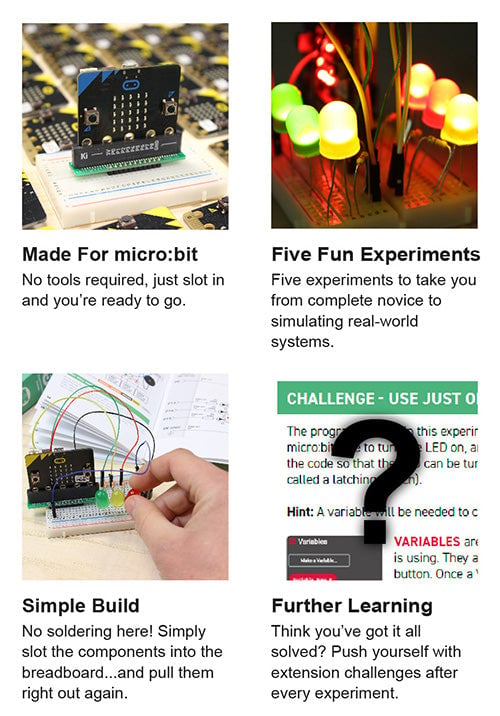
Take your first steps in physical computing with the Kitronik Discovery Kit for micro:bit.
Description:
The Kitronik Discovery Kit for BBC microbit is a great way to get started with both programming and electronics. The Kit contains five experiments that start very simply, building up to simulating real world systems as confidence grows.
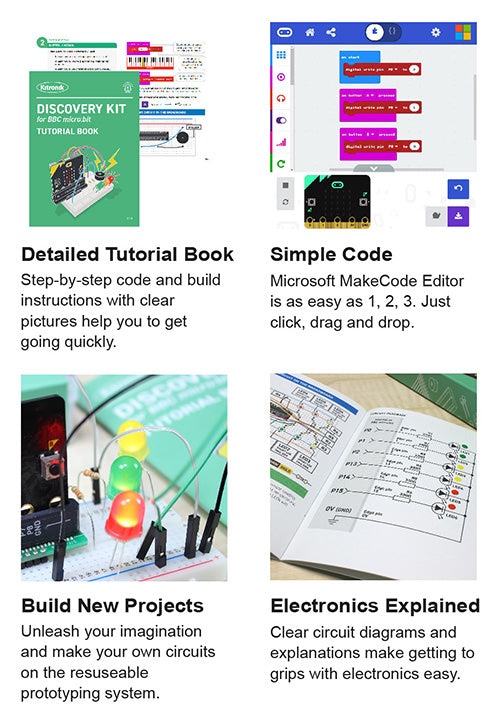
The included booklet assumes no prior knowledge and contains detailed information about everything the new user will need to know. It covers everything from using a prototyping board to how to use the Microsoft MakeCode Editor, and everything in between. This is the ideal kit for someone who is new to the micro:bit, electronics, and coding.
The kit contains five experiments and all of the components required to complete them. Each experiment has; a complete code walk-through, a circuit diagram and a top-down breadboard view, full explanations of what is happening, and how the electronics work.
Note:
- This kit does not include a micro:bit, a micro:bit can be obtained from here.
- No soldering is required and you can build your first circuit in minutes!
Features:
- This kit offers a great introduction to both coding and electronics.
- No soldering required – build your first circuit in minutes!
- Make the 5 experiments in the step-by-step tutorial book and learn as you go.
- All parts are included to conduct the 5 experiments.
- Once you have completed all of the included experiments, you have the perfect prototyping system for further adventures with the micro:bit.
- The code can be created in Microsoft’s easy to use MakeCode editor.
Contents:
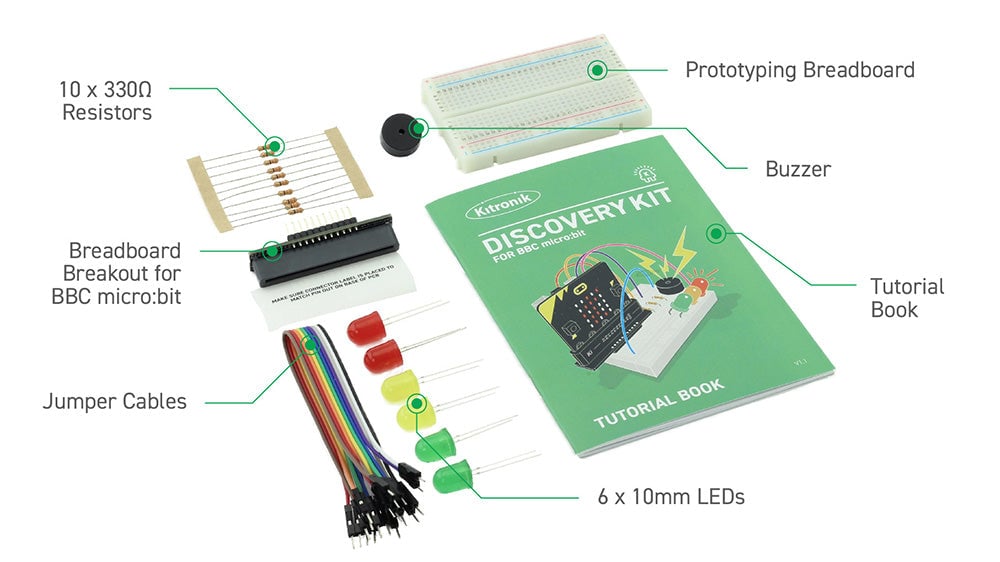
- 1 x Breadboard breakout for the BBC micro:bit.
- 1 x Small Prototype Breadboard.
- 2 x Red 10mm LED.
- 2 x Yellow 10mm LED.
- 2 x Green 10mm LED.
- 10 x 330Ω Resistor.
- 1 x Piezo Element Buzzer.
- 10 x Male to Male Jumper Wires.
- The included experiments are;
- LED Control Circuit.
- Buzzer Jukebox.
- Lights in sequence.
- Digital LED Thermometer.
- Traffic light with pedestrian crossing.
Video:
Requires:
Resources:
Below you will find three links. We have produced the code for each of the experiments, for each of the additional challenges, and also Python versions of each of the experiments. Each of the downloads are zip files, which will need to be unzipped to access the code examples. We have included two versions for each python experiment, a HEX file and a PY file.
- All 5 Experiments MakeCode Code Examples.
- All 5 Challenges MakeCode Code Examples.
- All 5 Experiments Python Code Examples.
MakeCode Instructions:
Connect the micro:bit to a spare USB port on your computer. The micro:bit will show up as a removable disk drive in File Explorer (Windows). Once unzipped, the individual MakeCode files can be dragged and dropped onto the micro:bit in File Explorer (Windows). An orange light will begin to flash on the rear side of the micro:bit, once the flashing stops the transfer is complete and the program can be run. Alternatively, the files can be dragged and dropped directly into the MakeCode editor.
Python Instructions:
Connect the micro:bit to your computer in the same way as outlined above. The HEX versions can be dragged and dropped onto the micro:bit in the same was a MakeCode HEX files. Alternatively, the files can be dragged and dropped directly into the Python editor or a Python ready editor of your choice.
- For more handy guides, visit the Kitronik University micro:bit page.
Third-Party Resources:
Insight Resources Mr Bit is an online educational coding platform that also features sections devoted to some of our key micro:bit accessories, including this kit. This content has been developed by Insight Resources and any questions relating to them should be directed at their contact information. To access these resources, please visit;
Documents & Downloads
Below you will find three links. We have produced the code for each of the experiments, for each of the additional challenges, and also Python versions of each of the experiments. Each of the downloads are zip files, which will need to be unzipped to access the code examples. We have included two versions for each python experiment, a HEX file and a PY file.
- All 5 Experiments MakeCode Code Examples.
- All 5 Challenges MakeCode Code Examples.
- All 5 Experiments Python Code Examples.
MakeCode Instructions:
Connect the micro:bit to a spare USB port on your computer. The micro:bit will show up as a removable disk drive in File Explorer (Windows). Once unzipped, the individual MakeCode files can be dragged and dropped onto the micro:bit in File Explorer (Windows). An orange light will begin to flash on the rear side of the micro:bit, once the flashing stops the transfer is complete and the program can be run. Alternatively, the files can be dragged and dropped directly into the MakeCode editor.
Python Instructions:
Connect the micro:bit to your computer in the same way as outlined above. The HEX versions can be dragged and dropped onto the micro:bit in the same was a MakeCode HEX files. Alternatively, the files can be dragged and dropped directly into the Python editor or a Python ready editor of your choice.
- For more handy guides, visit the Kitronik University micro:bit page.
Third-Party Resources:
Insight Resources Mr Bit is an online educational coding platform that also features sections devoted to some of our key micro:bit accessories, including this kit. This content has been developed by Insight Resources and any questions relating to them should be directed at their contact information. To access these resources, please visit;
Shipping rates Australia wide and New Zealand
FAQ:
- How do I estimate shipping for my order?
- Add products in the shopping cart and head to the checkout page to estimate the shipping.
Dispatch time
Unless expressly agreed otherwise with you, we will not commence delivery of an order until we have received cleared payment of the purchase price in full.
All orders placed before 11 am AEST (Monday to Friday) will ordinarily be processed on the same day.
We will endeavour to ship the Products by the applicable time indicated on the website, but all times are indicative only. All shipping times are dispatch times only, and actual delivery dates will depend on the shipping method chosen, delivery address and delivery service provider.
Note- Please make a note during purchase if you require any item urgently. However we cannot guarantee that we will be able to comply with any request.
*Go to Australia post delivery time calculation to get various Australia post service in your area please use our shipping postcode Thomastown, 3074 as the "from" address - https://auspost.com.au/parcels-mail/delivery-times.html?ilink=tools-open-deliv-times.
We ship all products throughout mainland Australia, Tasmania and New Zealand - Including Darwin, Melbourne, Sydney, Tasmania, Adelaide, Brisbane, Perth, all metro and regional areas but do not deliver to areas in Australia where the Australia Post delivery network is not available.
Check Express shipping delivery coverage area at - http://auspost.com.au/parcels-mail/delivery-areas.html
Receipt of deliveries
Deliveries to post office boxes are not permitted where delivery is by courier. If delivery is by courier and nobody is available at the delivery address to accept delivery when delivery is attempted then the courier may either:
- leave the relevant parcel at the unattended address (the courier will do so if specified in your delivery requirements); or
- re-attempt delivery at a later time or date, in which case we may charge you an additional re-delivery fee.
Note that if a delivery is left unattended at the shipping address and is subsequently stolen then the theft is your responsibility, not ours.
Payment & Security
Your payment information is processed securely. We do not store credit card details nor have access to your credit card information.